
Inverse Kinematics
For my Specialization at The Game Assembly I chose to make in-engine inverse kinematics allowing us to tweak character animations based on surroundings. Even though the character adjustments tend to be quite subtle the impact on player immersion can be astounding. The characters start feeling like part of the world through simple gestures like having feet aligned to the ground or a hand pushing up a door in front of them.
FABRIK
The technique I chose for implementing inverse kinematics was FABRIK. It stands for forwards and backwards reaching inverse kinematics. It works by repeatedly “pulling” a chain of positions back and forth between the target and the base. Simple video explaining the algorithm here.
Since it works by manipulating positions the principles are the same for 2D as for 3D, so I implemented it in 2D first to get an understanding for the method.

Engine Implementation
When the 2D concept was done it was time to implement it into the engine. This meant implementing it into 3D and applying it on a model. Before starting I first needed to set up the testing environment. Firstly I added the option of visualising a model’s bones in our modelviewer that already could load a model and apply animations on it. Secondly I implemented picking so that you only need to click on your joint to select your sub-chain. Lastly I added a simple slider for x, y and z to designate a target.

Moving my work from 2D to 3D went almost as smoothly as it could have. In the 2D version I structured it as closely to the engine as possible. This meant moving the code itself was painless since the interface was already accounted for.


When working with animations moving the positions of the joints isn’t enough. The rotation also needed to be accounted for. Instead of setting the positions outright I instead calculated the rotation required to get from the old local position to the new one. Used arccos on the positions dot product to get the angle between the two points, followed by the cross product to get the axel. With this I could get a quaternion that could be applied to rotate the bone into position. I essentially apply forward kinematics on each bone in the chain to reorient them onto the path created by the inverse kinematics.
Pole Vectors
When using inverse kinematics there is a common recurring problem; there are endless ways to reach a target using a sum of vectors limited only by length resulting in a chain being able to bend in any number of ways. To be able to work with IK that doesn’t result in having examplewise knees bending outwards there needs to be a way to influence the direction a chain bends in. This is what pole vectors aim to solve.


Pole vectors take a chain of 3 joints and use the first and last axel, then it takes the middle joint and rotates it around the axle to face towards the pole vector’s direction. This will however limit the use case quite significantly since it can only be applied to chains of 3. When doing some research on it I had trouble finding anything about making it more versatile. According to Unreal’s documentation on Pole Vectors here; they do allow for multi jointed chains, but it wasn’t clear how it achieves this.
Other solutions I found applied the pole vector for the first 3 joints in the chain then taking 3 joints starting from the second to first and applying it again until you have reached the end. This approach works yet has its own flaws since it creates axles with joints that have not yet been adjusted. In short it becomes dependent on the initial positions of the chain, resulting in inconsistent results.
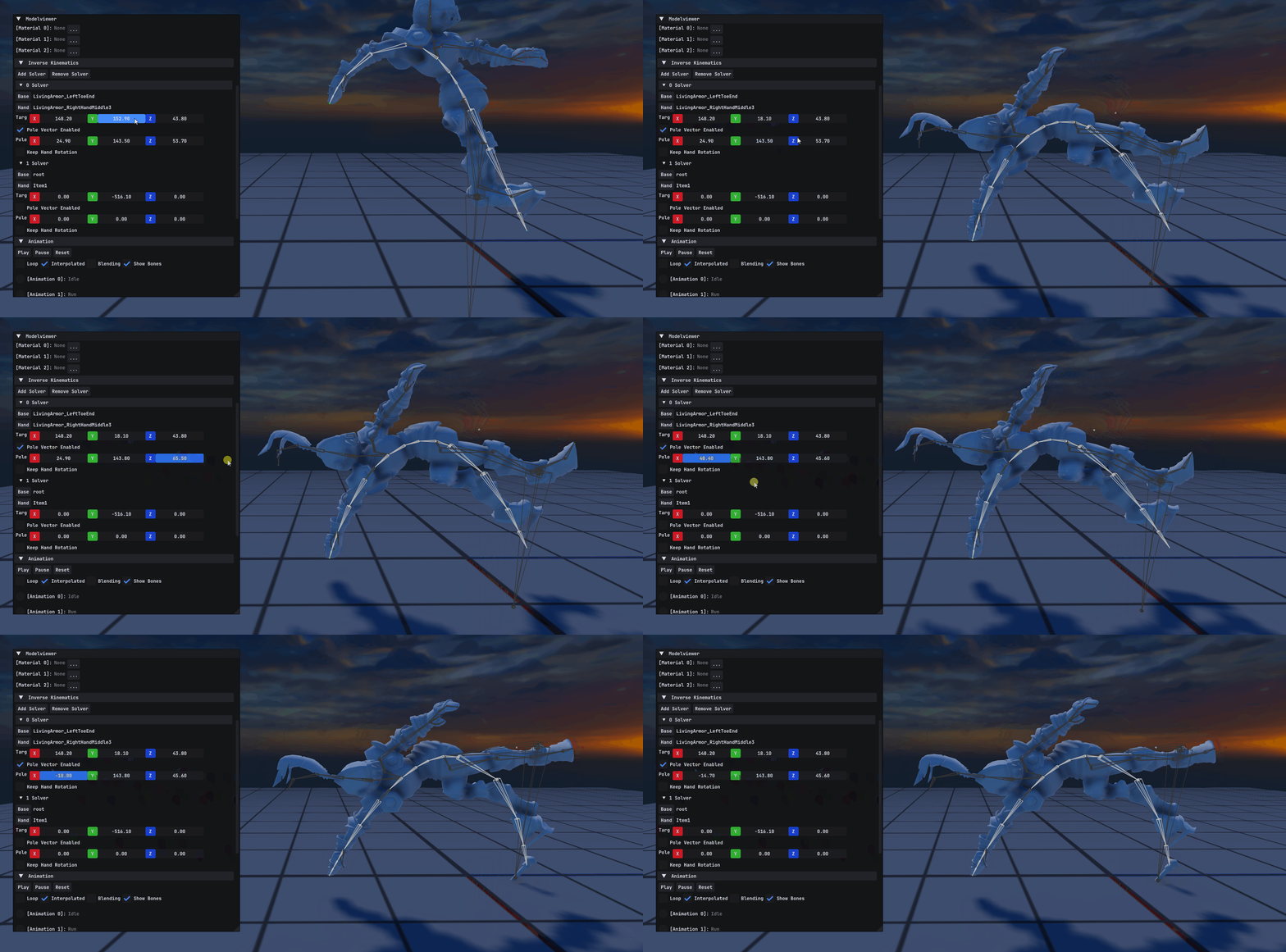
I talked with several students from the other disciplines to get a better understanding for the desired effect. I got the analogy of a scorpion tail where it curves towards the pole vector. After a day of brainstorming I came up with a solution, that being realigning the entire chain to point towards the pole vector before applying FABRIK. With a quick test in 2D it proved effective. The result was a very nice curve reminiscent of a 3 point bezier curve.

Foot Solver
After having created the core systemparts for my inverse kinematics it was finally time to apply it onto a proper character. I set out to create a simple foot solver that could adjust a character’s feet positioning as to be grounded. After quickly adding a toggle for keeping the original orientation on the end of the chain I only needed to combine it.
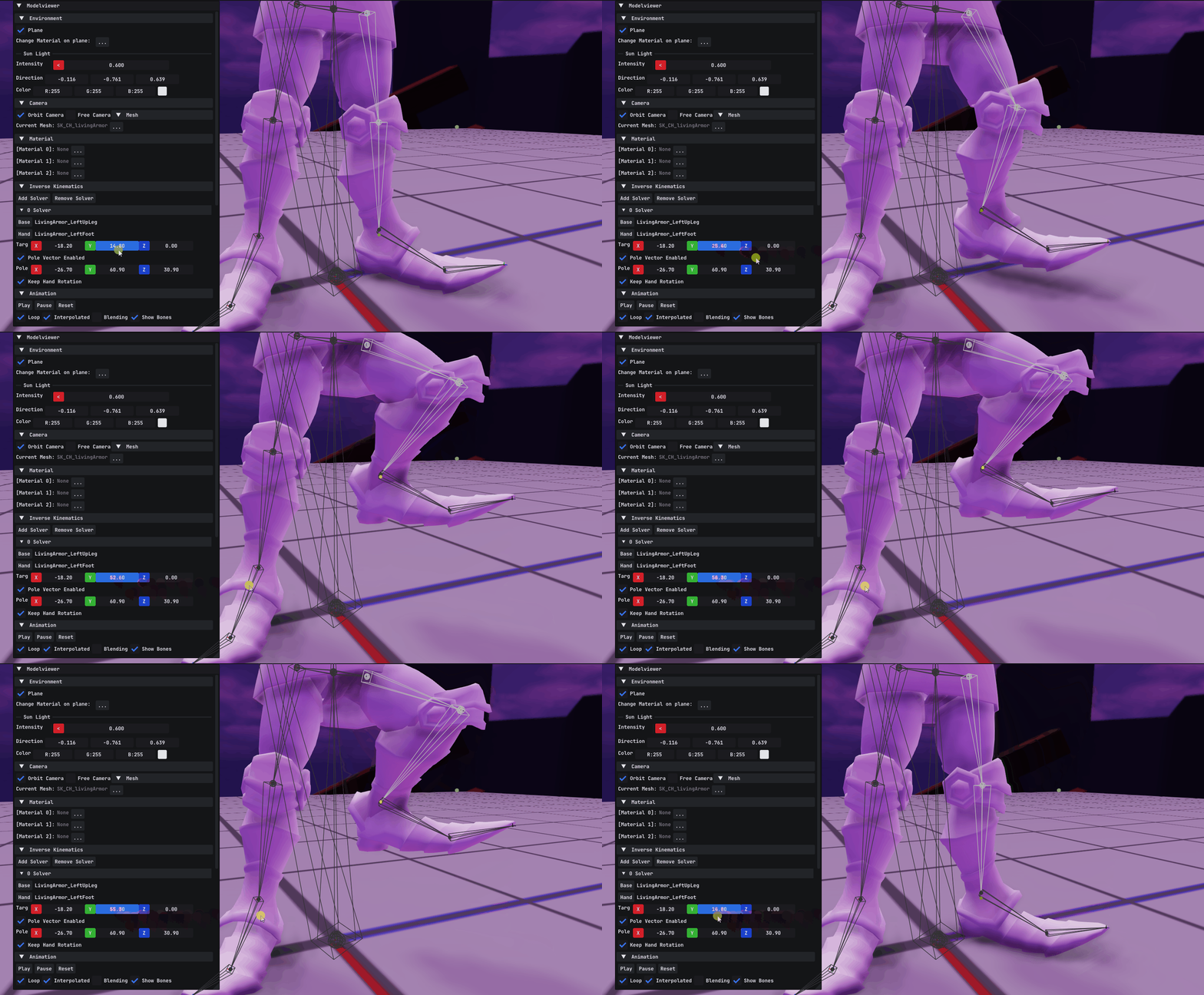
The legs can now lift properly, however if the character is levitating lifting the legs further would not help. The usual method would be using a solver that moves the base along with it when the chain gets stretched. However that would require further alterations to the system. Instead I went with a much simpler method where you first move the character down to the lowest foot position and then move the other foot up. The idea of moving the character was taken directly from a fellow TGA student described here.

Conclusions & Reflections
Thanks to using FABRIK it allowed for a quick start implementing it into 2D. The benefits of a 2D implementation was being able to strip down the problem to only the essentials and being able to add on the complexity of 3D later. It also allowed for better foreknowledge when setting it for real. The biggest help was changing the iterating over the chain from using functions like ‘begin’, ‘end’, ‘rbegin’ and ‘rend’ to more readable ‘beginBase’, ‘endHand’, ‘beginHand’ and ‘endBase’.
With the lack of resources on pole vectors it became quite the challenge. The conundrum of having to either hunt for more detailed sources that specify proper implementation or having to create the solution with only a result in mind.
There were however a lot of things that couldn’t be made to satisfaction. This system still has a lot of potential improvements and further developments I wish I had time for. Connecting it to our custom engines visual scripting system for instance would give easier manipulation of the solvers. Adding weight that would interpolate between the starting position and the result would help mitigate the chopines that can be created. Having combined that with a proper move solver that moves a character down could further smooth the snapping of the character height adjustments.